Can Apple Watch Show My Bike Sensors?
Yes, in two ways, one at a time. Apple's Workout app pairs a power meter, speed sensor or cadence sensor to the Watch itself. With Bike IQ, your sensors pair to your iPhone and the Bike IQ Watch app shows their numbers on your wrist, free. While an Apple workout is running, the Bike IQ Watch app cannot open, so pick one for each ride.
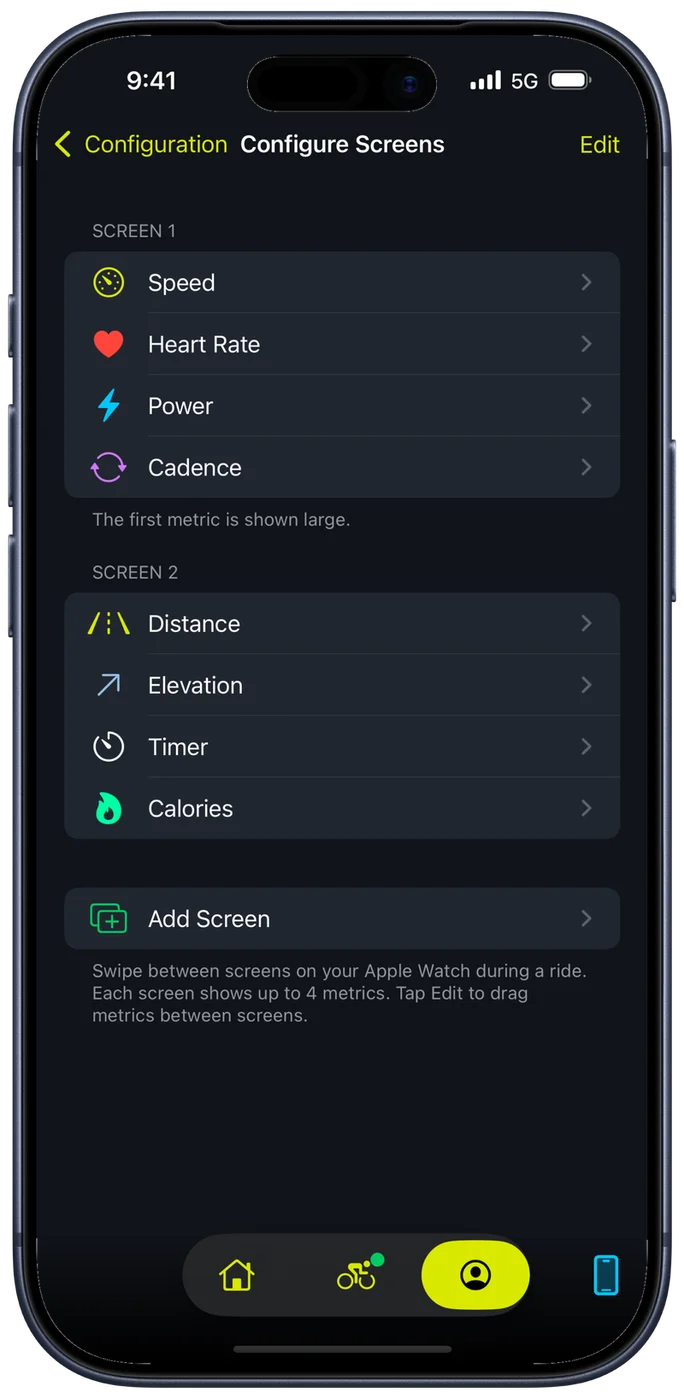
Apple Workout App and Bike IQ Side by Side
| Apple Workout app | Bike IQ | |
|---|---|---|
| Sensors pair to | Apple Watch | iPhone |
| Sensors | Power meters, speed and cadence sensors | Power meters, heart rate straps, speed and cadence sensors, radar, Shimano Di2 and SRAM AXS gears, supported e-bikes |
| On your wrist | Power, cadence and power zones in the cycling workout | Up to 4 metrics on each of up to 6 screens, from 14: speed, average speed, heart rate, power, cadence, grade, distance, elevation, timer, calories, gear, radar, wind impact and Ride XP |
| On your iPhone | A Live Activity | The full ride screen with the live map |
| Cost | Built in | Free |
Apple facts are from Apple's guide Go cycling with Apple Watch, read November 2026. It does not list radar, e-bikes or electronic shifting.
What Bike IQ Adds
- A ride screen on the handlebar. Your iPhone shows every number beside the live map, and the Watch shows the ones you pick.
- Radar and gears on your wrist. The Radar metric shows how many vehicles are behind you and how close the nearest is. Gear shows your Di2 or AXS gear.
- Controls on your wrist. Pause, resume, mark a lap and end the ride from the Watch.
- Turn signs, with Pro. While you follow a route, the next turn shows at the top of the Watch screen.
Pick One for Each Ride
The Watch runs one workout at a time. If you start a cycling workout in Apple's Workout app, the Bike IQ Watch app cannot open until you end it. To use Bike IQ on your wrist, start the ride in Bike IQ and do not start an Apple workout.
Sensors work the same way: most hold one connection at a time. A power meter paired to the Watch's Workout app is taken, and Bike IQ on your iPhone cannot see it until the Watch lets it go. Pick one device for each sensor before you ride. See Bluetooth Sensor Pairing.
Set It Up in Bike IQ
- Pair your sensors in Bike IQ on your iPhone: Bluetooth Sensor Pairing.
- The Bike IQ Watch app installs with Bike IQ on a paired Watch. If it does not appear, install it from the Watch app on your iPhone.
- Choose what the Watch shows: open the Settings tab, then Apple Watch under Sensors & Devices, then Configure Screens.
The Watch also sends your heart rate to Bike IQ, so you do not need a strap. See Apple Watch. Riding with a Garmin, Huawei or Amazfit watch? Bike IQ can use its heart rate: see Works With.
Questions
Can Apple Watch connect to a bike power meter?
Yes. Apple's Workout app pairs Bluetooth power meters, speed sensors and cadence sensors, and adds power and cadence to the cycling workout. With Bike IQ, the power meter pairs to your iPhone instead, and the Bike IQ Watch app shows your power on your wrist.
Does the Bike IQ Watch app show power and cadence?
Yes. Its first screen starts with speed, heart rate, power and cadence. The numbers come from the sensors paired to Bike IQ on your iPhone, or from Bike IQ's estimates when you ride without them.
Can I see my radar on Apple Watch?
Yes, with Bike IQ. Add Radar to a Watch screen: it shows how many vehicles are behind you and how close the nearest one is, and reads Clear when the road behind is empty.
Can I pair the same sensor to my Apple Watch and to Bike IQ?
Not at the same time. Most sensors hold one connection at a time, so pair each sensor either to the Watch or to Bike IQ on your iPhone for a ride.
Can I run an Apple Watch workout and Bike IQ at the same time?
No. While a workout from Apple's Workout app is running, the Bike IQ Watch app cannot open on the Watch. Start the ride in Bike IQ instead, and the Watch shows your Bike IQ screens.
Is the Bike IQ Watch app free?
Yes. The Watch app, its screens and every sensor Bike IQ supports are free. Bike IQ Pro adds routes and turn-by-turn navigation, and the turn sign on the Watch shows while you navigate.