Bluetooth Sensor Pairing Guide
Bike IQ pairs with Bluetooth cycling sensors: heart rate, power, speed, cadence, radar, tire pressure, and electronic groupsets. One screen scans for all of them, and works out where each one belongs.
One Screen for Every Sensor
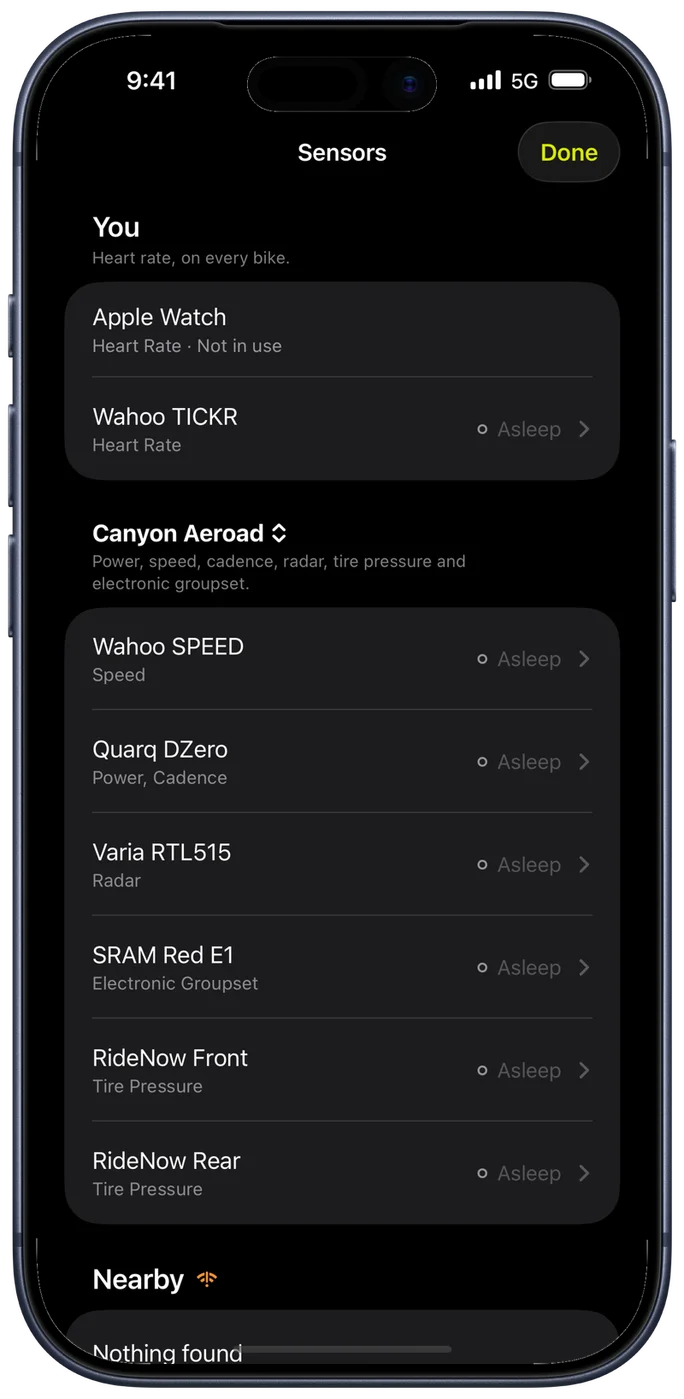
Every sensor is added from the same place. Open Connect Bluetooth Sensors, either from the bike you are setting up or from your profile, and the Sensors screen opens. It scans for everything at once, so a heart rate strap and a power meter both turn up in the same list no matter which route you took to get there.
The screen is organized by what a sensor belongs to:
- Your bike, listed under its own name: power meters, speed and cadence sensors, radar, tire pressure sensors, and electronic groupsets. With more than one bike, tap the bike's name in the header to look at another one without leaving the screen.
- You: heart rate monitors, which work on every bike. Your Apple Watch appears here too when it is paired.
- Nearby: everything Bike IQ can currently see that is not already added.
If you own several bikes, the sensors on the others collapse into a single row so the list stays short, and you can add one to the bike you are setting up from there.
Adding a Sensor
- Wake the sensor: spin the cranks, turn the wheel, put on your heart rate strap, switch the radar on.
- Open Connect Bluetooth Sensors from your bike or from your profile.
- Wait for the sensor to appear under Nearby and tap it.
Bike IQ knows what kind of device it is, so it goes to the right place on its own. A heart rate monitor is added to you and works on every bike. Everything else belongs to a bike: with one bike, it is added there; with two or more, Bike IQ asks whether it goes on the bike you are looking at, another one, or all of them. That last option is the quick way to handle a pedal-based power meter or a heart rate strap's bike-side equivalent that moves between bikes.
Once added, the sensor becomes the source for what it measures. Power meters become your power source, speed sensors your speed source, and so on. Remove one and Bike IQ falls back to iPhone GPS for speed or to virtual power estimation.
If Nothing Shows Up
Sensors go to sleep to save battery and only advertise themselves once they are in use. Spin the cranks, wet the contacts on a heart rate strap, and turn off any bike computer or watch that is already connected to it: most sensors hold one connection at a time and disappear from everyone else while they are taken.
If your sensor still does not appear and you think it should be supported, tap Can't find your sensor? at the bottom of the screen and tell us the brand and model.
Renaming, Unassigning, and Forgetting
Swipe left on any sensor you have added for three actions:
- Rename gives it a name you will recognize, which is worth doing when you own two of the same model.
- Unassign takes it off that bike but keeps it on the others it is assigned to.
- Forget removes the sensor and its settings entirely. You can add it again by scanning for it.
Tap a sensor instead of swiping to open its details, where you can see what it is currently providing and change what Bike IQ uses it for.
Using One Sensor on Several Bikes
The same sensor can be on as many bikes as you like, which is what you want for a heart rate strap, pedal-based power meters, or a radar you move from bike to bike. Adding it to a second bike leaves it on the first.
When a sensor is on more than one bike, its row says so, so you always know whether removing it here affects the rest of your garage. When you select a bike before a ride, Bike IQ connects to that bike's sensors automatically.
Apple Watch Integration
Apple Watch provides heart rate monitoring during rides. It does not record independent workouts.
Setup
- Open iPhone Settings → Health → Data Access & Devices → Bike IQ
- Enable Heart Rate permission
- In Bike IQ, tap Connect Bluetooth Sensors from your profile. The watch appears under You; tap it to make it your heart rate source.
When you start a ride in Bike IQ, Apple Watch automatically begins heart rate monitoring and sends live data to your iPhone. It stops when you end the ride.
What Happens When a Sensor Disconnects
If a sensor loses connection during a ride (battery dies, out of range, interference), Bike IQ handles it gracefully:
- Power meter disconnects: Bike IQ falls back to virtual power estimation using the iPhone's built-in sensors and weather data. Your ride recording continues without interruption.
- Heart rate monitor disconnects: The HR widget shows the last known reading briefly, then indicates no signal. Reconnection is automatic when the sensor comes back in range.
- Speed sensor disconnects: Bike IQ falls back to GPS-based speed, which is accurate for most riding.
- Radar disconnects: The radar overlay disappears from the ride screen. No false alerts are generated.
All sensor data is timestamped and recorded per-sample, so gaps from disconnections appear accurately in your post-ride analysis rather than being filled with estimated data.
Advanced Sensors
Electronic Groupsets: SRAM AXS and Shimano Di2
Bike IQ pairs directly with electronic groupsets from both SRAM and Shimano, so your gears, battery levels, and shifts show up live with no separate head unit. Once paired, every shift appears in real time in the gear widget and on the ride summary, and gear position is recorded every second into your ride report alongside cadence and power.
SRAM AXS works with any SRAM AXS groupset. Pairing is a one-time handshake: tap the AXS derailleur in the device list, press and hold the AXS button on the rear derailleur until the LED flashes, then tap Continue. After that, your phone reconnects automatically whenever you are near the bike. Battery levels for the rear derailleur, front derailleur (on 2x), and both shifters show up in the sensor list so you know where you stand before a long ride.
Bike IQ also supports Shimano Di2. Connect your Di2 groupset for live gear position, battery level, and shift tracking, the same way you pair any other bike sensor. No extra pairing button or head unit is required.
On Pro, your shifter buttons become controls, on both SRAM AXS and Shimano Di2. The main paddles are always mappable, and any extra buttons your shifters expose (hood buttons on newer SRAM Red and Force groupsets, bonus buttons on Blip remotes, or the auxiliary buttons on Di2 shifters) are auto-discovered the first time you press them. Left and right are tracked separately, so each gets its own action: Ring Bell, Mark Lap, Pause / Resume, Toggle Map or Next Dashboard, which turns to your next Smart Page without taking a hand off the hoods. A button can also run an Apple Shortcut, which covers anything else you want to automate.
Tire Pressure Sensors
Bike IQ works with the RideNow TPMS 1.0, the Tubolito SYNCD and the Quarq / Zipp TyreWiz, giving you live pressure readings while you ride. See Tire Pressure Sensors for what each one reports. Front and rear are assigned separately, so Bike IQ always knows which wheel a reading belongs to. When pressure drops below your configured threshold, an alert names the affected tire and offers to pause your ride or set a re-alert threshold. See Safety Features for details on pressure alerts.
The RideNow sensors fit onto your valves and report pressure and temperature continuously. The SYNCD is a smart inner tube with the sensor built in, and the TyreWiz screws onto the valve. Both of those broadcast their reading rather than holding a connection, so there is no pairing step, and in place of a battery bar they show a dot that is lit while readings are arriving.
E-Bike Drives
Bike IQ reads the TQ HPR40 and HPR50 drive units. A connected drive gives you the motor's power, the assist mode you are in (Off, Eco, Mid and High, plus Walk), and the charge left in the e-bike's battery, and it doubles as a power, cadence and speed sensor for the ride.
Your own power and the motor's are kept apart. Only your watts are published to Strava and Apple Health, and only your watts count toward your FTP. The ride report shows the two side by side for the ride and for each lap.
Set it up from your bike's settings, under Sensors, where the E-Bike row leads to the sensor list. If your e-bike is not one Bike IQ knows yet, tap Can't find your sensor? in that list. It sends us the brand and model along with what your bike is broadcasting, which is how new drives get added.
Rear Radar
Bike IQ supports rear-facing cycling radars from a wide range of brands. A paired radar detects vehicles approaching from behind and displays them on the ride screen with distance indicators, visual lane markers, and audio alerts. See Safety Features for setup details and Radar Settings for configuration options.
Supported radars:
- Garmin Varia RTL515, Varia RTL516, Varia RVR315, Varia RCT715
- Garmin Varia RearVue RVR820
- Trek CarBack
- Bryton Gardia R300, Gardia R300L
- CYCPLUS L7
- Giant Recon+ TL300 R
- Magicshine SEEMEE R300
- Magene L508
- Lezyne Radar Drive Rear
- COOSPO TR70
- iGPSPORT SR30, SR mini
- SIGMA RECO 80 LINK, RECO 81 LINK
A few of these broadcast enhanced data, and Bike IQ uses it. With the Garmin Varia RearVue RVR820 or the Trek CarBack connected, the widget switches to a 2D view that shows lateral position, so you can see not just how far a vehicle is behind you but how wide a berth it is giving you as it passes. All other supported radars use the standard radar interface with distance-based alerts.
See Supported Radars for the full list, what each radar reports, and the setup quirks worth knowing.
Troubleshooting
Sensor Not Appearing
- Check sensor battery level
- Ensure sensor is active (spinning, pressed, worn)
- Make sure the sensor is not already connected to another device or app. Many sensors allow only one active connection, and they stop advertising (and become undiscoverable) while connected elsewhere. Close other cycling apps on your phone and turn off nearby head units or watches that may have grabbed the sensor.
- Move closer to reduce interference
- Tap "Scan Again" to refresh device list
Connection Issues During Rides
- Verify iPhone placement doesn't block antennas
- Replace sensor batteries proactively
- Minimize interference from other devices
ANT+ Sensors
Bike IQ supports Bluetooth LE sensors. Most modern cycling sensors broadcast over both ANT+ and Bluetooth, so they will pair directly with Bike IQ without any extra hardware. Older ANT+ only sensors require a Bluetooth bridge device.
Getting Started
Bike IQ works excellently without any external sensors. Power is estimated from physics, cadence is detected from your iPhone's motion sensors, speed comes from GPS, and grade from the barometer. Adding Bluetooth sensors enhances data accuracy and provides additional metrics like heart rate.
Start with heart rate if you own an Apple Watch or chest strap. Add power meters and other sensors as needed for your training goals.