iPhone as a Bike Computer: Everything You Need, Already in Your Pocket
A serious cycling computer (one that shows live power, navigation, and full sensor data) costs $400 or more, before you add a power meter. Bike IQ turns the iPhone already in your pocket into exactly that, without the extra device.
Why Use Your iPhone Instead of a Garmin or Wahoo?
The most important reason isn't price. It's this: you never have to give up the map to read a number.
On a small head unit, a data page and a map page are different pages, because there is not room to be on both at once. You configure them, then swipe between them mid-ride and choose, every time, between seeing where you are going and seeing how hard you are going. Bike IQ has pages too, and you build them the way you want. The difference is what a page controls: it changes the metrics, and the map, the weather, your gears and the radar stay exactly where they are. A 6.1 inch display is what makes that possible where a 2.6 inch one cannot.
That's an opinionated design choice, and it's intentional. The best moment to see the map is the same moment you're watching your effort, so the map never gives way to make room for numbers. You can build your own pages and turn between them, and every one of them keeps the map, the weather and the controls exactly where they are.
- Numbers and map together: Power, speed, grade, cadence, heart rate and weather beside a live map. Build your own pages of metrics on top of that, and let them come up on their own when the road changes.
- Bigger screen: A 6.1" iPhone display is nearly twice the size of a Garmin Edge, built for one-glance reads at speed.
- Every metric, no hardware: Power, cadence, grade, gears, speed. All from your iPhone's built-in sensors. Garmin and Wahoo just display what your sensors send them.
- Already in your pocket: Most cyclists carry their iPhone anyway. Bike IQ makes it do significantly more.
What Bike IQ Shows You During a Ride
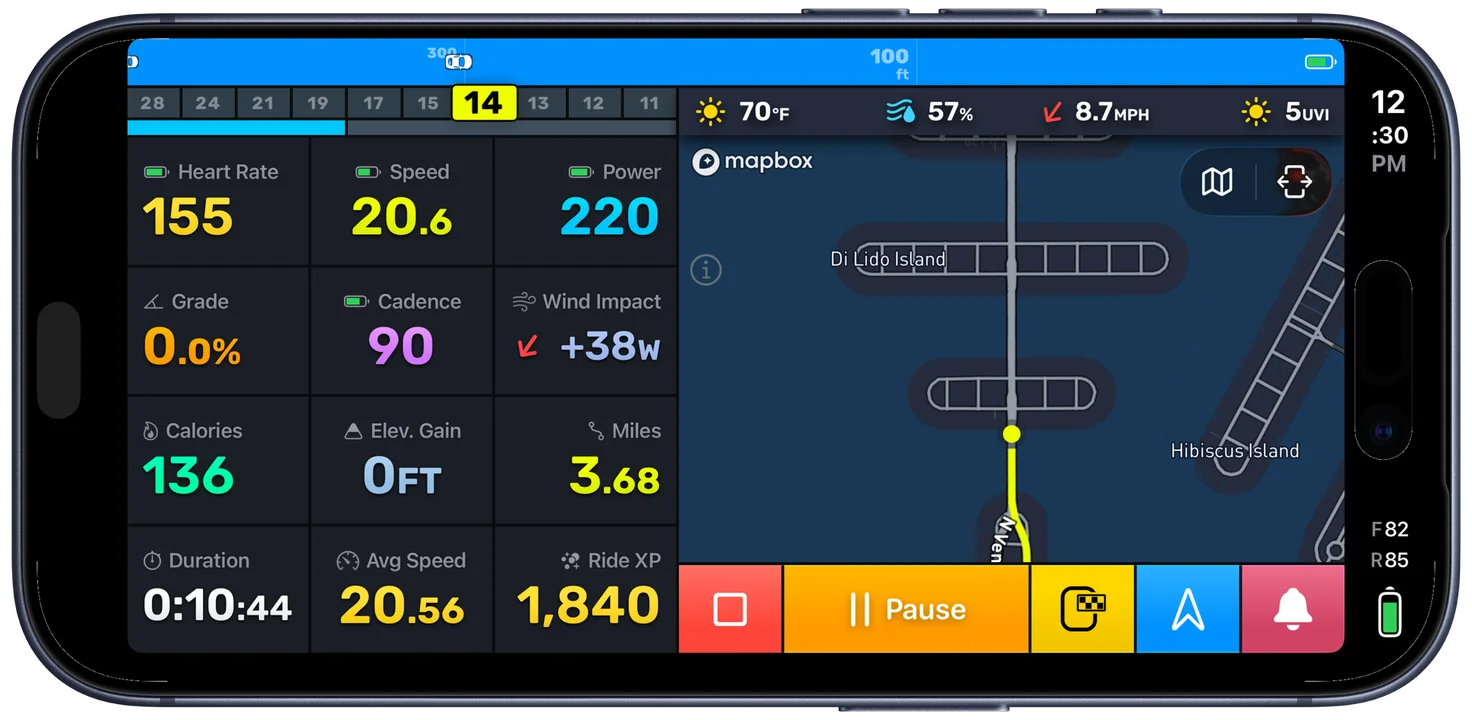
The map never leaves the screen. Build pages of your own on top of it and turn between them mid-ride: what changes is the metrics, not whether you can see where you are going.
From Your iPhone's Built-in Sensors
- Power: estimated watts in real time via the virtual power meter
- Speed: current pace via GPS
- Grade: road gradient from barometer + accelerometer fusion
- Cadence: pedaling RPM detected from your iPhone's motion sensors
- Distance and elapsed time
- Live map: your position, always visible
- Weather: temperature and wind conditions
From Paired Bluetooth Sensors (Optional)
- Heart rate: live BPM and HR zones from a Bluetooth HRM, displayed as an independent metric alongside power and speed
- Speed: wheel-speed data from a speed sensor (supplements GPS)
- Power: real watts from a hardware power meter (also calibrates the virtual power model)
- Cadence: from a dedicated cadence sensor, if you prefer hardware
Every one of these reads on the same screen as the map, whichever page you are on.
Battery Life
The most common concern, and it deserves a direct answer.
Bike IQ uses roughly 10% battery per hour on a typical ride: GPS active, screen on, Bluetooth sensors connected. That means a standard iPhone handles a 6-hour ride with charge to spare, and newer models (iPhone 15 Pro and later) can push close to 10 hours before needing a top-up.
For rides beyond that: A handlebar-mounted USB-C battery pack solves it completely. An Anker or Mophie in a frame bag or jersey pocket keeps you running indefinitely, the same solution most long-ride cyclists already use for navigation.
Extending battery:
- Reduce screen brightness (the single biggest factor)
- Enable Low Power Mode before long rides
- Use a mount that blocks direct sunlight. Heat drains batteries faster than usage
- Disable cellular data on familiar routes
Mounting Your iPhone
A good mount makes the difference.
Stem Mounts (Recommended)
Position your phone directly in your line of sight, the same spot as a Garmin. Quadlock and K-Edge make excellent stem-compatible systems with secure mechanical locks. Quadlock's MagSafe cases work well with recent iPhones.
Out-Front Handlebar Mounts
Similar position to stem mounts with more flexibility. Good option if your stem doesn't fit a standard mount.
What to Avoid
Cheap rubber band-style mounts. Vibration on rough roads will shake them loose. Use a mount with a mechanical lock.
Bike IQ vs. Dedicated Cycling Computers
| Feature | Bike IQ (iPhone) | Garmin / Wahoo |
|---|---|---|
| Power without a power meter | Built-in virtual power | Not available |
| Cadence without a sensor | Built-in detection | Not available |
| Cost | Free download | $400+ (serious computers) |
| Screen size | 6.1"+ display | 2.6" to 3.5" display |
| Learns your riding characteristics | Adaptive model | Static display |
| Battery (no external charger) | 6 to 10 hours (about 10%/hr) | 8 to 24 hours typical |
| Bluetooth sensor support | Power, HR, cadence, speed, radar, tire pressure, Di2 and AXS, TQ e-bike drives | Power, HR, cadence, speed, radar, tire pressure, electronic groupsets |
| Build your own data pages | From more than 150 tiles, with the map still on screen | Yes, instead of the map |
| Phone, music, navigation | It's your iPhone | Single-purpose |
Already Have a Garmin?
If you ride with a Garmin but don't own a power meter, run Bike IQ alongside it. You get virtual power data your Garmin can't provide. Many riders find they prefer the larger display and integrated map for most riding situations.
Get Started
Five minutes from download to first ride. See the Getting Started Guide for setup, or learn how the virtual power meter works.