Supported Radars
Bike IQ pairs with rear-facing cycling radars from Garmin, Trek, Bryton, CYCPLUS, Giant, Magicshine, Magene, Lezyne, COOSPO, iGPSPORT, and SIGMA. A paired radar shows vehicles approaching from behind on your ride screen, with how far back they are and an audio alert as they close in.
The Full List
There is no shared Bluetooth standard for bike radar. Every manufacturer invented its own format, so each one has to be supported individually. These are the radars Bike IQ speaks to today.
| Radar | What you see | Widget |
|---|---|---|
| Garmin Varia RTL515, Varia RTL516, Varia RVR315, Varia RCT715 | Distance | Single lane |
| Garmin Varia RearVue RVR820 | Distance, Position across the road, Vehicle type (truck, car, motorbike) | 2D view |
| Trek CarBack | Distance, Position across the road | 2D view |
| Bryton Gardia R300, Gardia R300L | Distance | Single lane |
| CYCPLUS L7 | Distance | Single lane |
| Giant Recon+ TL300 R | Distance | Single lane |
| Magicshine SEEMEE R300 | Distance | Single lane |
| Magene L508 | Distance | Single lane |
| Lezyne Radar Drive Rear | Distance | Single lane |
| COOSPO TR70 | Distance | Single lane |
| iGPSPORT SR30, SR mini | Distance | Single lane |
| SIGMA RECO 80 LINK, RECO 81 LINK | Distance | Single lane |
How Bike IQ Follows a Car
A radar reports what it sees several times a second, as a list sorted by how close each vehicle is. That list is not a list of cars: as soon as one vehicle passes you, every car still back there moves up a place. Bike IQ now works out which reading belongs to which car by matching them up between frames, rather than trusting their position in the list, and gives each car an identity it keeps until it is gone.
What you get from that is a steadier picture. Cars stop appearing twice, a car that was briefly dropped between frames stays on screen instead of vanishing and coming back as a new one, and closing speed settles instead of jumping around. A car's speed is only shown once a second reading agrees with the first, so the number you see has been checked. Bike IQ also holds on through the short gaps where a radar reports nothing at all, which is why a car no longer blinks out on a quiet stretch.
This is the same for every radar on the list, and it is most noticeable on the COOSPO TR70, the CYCPLUS L7 and the Bryton radars.
How Threat Level Works
Bike IQ decides the threat level from one thing: how far away the nearest vehicle is. A vehicle inside 30 meters (100 feet) is a high threat, inside 100 meters (300 feet) is medium, and anything beyond that is low. The widget color and the audio alert both follow from that.
Those thresholds are the same for every radar on this list. That is deliberate. It means the alert threshold you pick in Radar Settings behaves identically whichever radar you own, and swapping one brand for another does not quietly change when Bike IQ warns you.
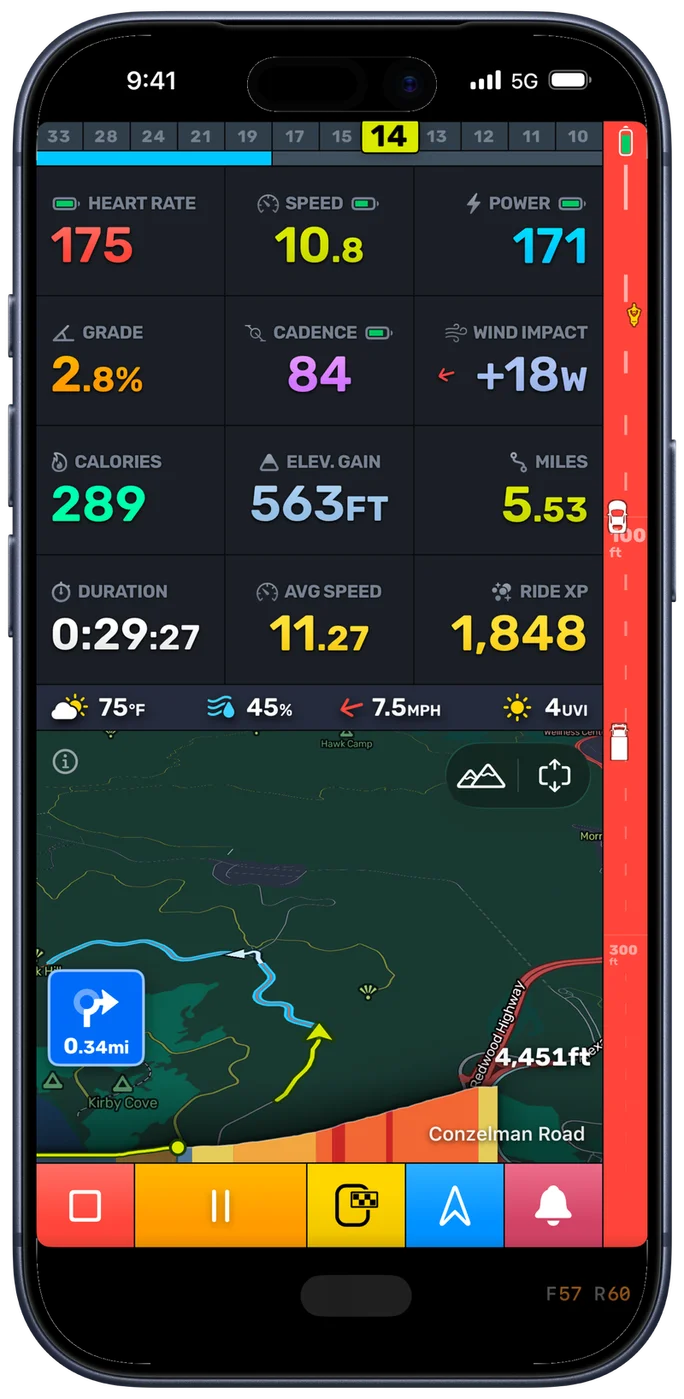
Radar works on the free version of Bike IQ. There is nothing to unlock.
Radars With a 2D View
Every radar tells you how far behind a vehicle is. Two of them also tell you where it sits across the road, and Bike IQ draws that. The widget switches from a single lane to a 2D view, so a vehicle appears where it actually is behind you rather than as a dot on a line.
- Garmin Varia RearVue RVR820: adds position across the road, vehicle type (truck, car, motorbike)
- Trek CarBack: adds position across the road
With the RearVue 820, that includes what is coming: a truck, a car, or a motorbike, each drawn as itself. A truck filling your lane and a motorbike slipping past are very different things to hear about, and you can tell them apart at a glance instead of reading a distance.
Every other supported radar uses the single-lane widget, where a vehicle moves up the lane as it closes on you. The threat levels and audio alerts are the same either way, so nothing about your warnings changes.
Before You Pair
Most radars are ready as soon as you switch them on. These need one thing done on the radar first.
- CYCPLUS L7: Turn radar mode on in the CYCPLUS app first, and check that the light is on firmware 2.1.0 or later. Until you do, the L7 does not show up as a radar.
Pairing a Radar
Radars pair the same way as any other Bluetooth sensor:
- Power on the radar and make sure it is not connected to another head unit or phone app. Most radars only hold one connection at a time.
- In Bike IQ, open your bike and tap Connect Bluetooth Sensors.
- Tap your radar when it appears in the list.
The radar is saved to that bike, so it reconnects on its own the next time you ride. See Bluetooth Sensor Pairing for the full walkthrough, and Radar Settings to set the widget position, audio alerts, and alert threshold.
Note: If your radar does not appear, the usual cause is that it is still connected to the manufacturer's own app or to a bike computer. Close that app, or turn the head unit off, and scan again.
Missing a Radar?
New sensors get added based on what people are actually riding, so if yours is not on this page, tell us and it goes on the list.
The best way to do that is from inside Bike IQ. On the sensor scan screen, tap Can't find your sensor? and send us the brand and model.
Related Guides
- Radar Settings: widget position, animated lane, audio signals, and alert threshold
- Bluetooth Sensor Pairing: pairing radar and every other sensor type
- Safety Features: radar, tire pressure monitoring, and the bike bell
- Troubleshooting: what to do when a sensor will not connect or keeps dropping