Tire Pressure Sensors
Bike IQ reads tire pressure sensors from RideNow, Tubolito and Quarq / Zipp. Pressure appears on your ride screen beside everything else, and Bike IQ warns you when a tire drops below the threshold you set for that bike, before a slow leak becomes a flat.
The Full List
There is no single Bluetooth standard for tire pressure, so each sensor has to be supported on its own terms. These are the ones Bike IQ reads today.
| Sensor | How it fits | What you see |
|---|---|---|
| RideNow TPMS 1.0 | Screws onto the valve | Pressure, Temperature, Battery |
| Tubolito SYNCD | Built into the inner tube | Pressure, Temperature |
| Quarq / Zipp TyreWiz | Screws onto the valve | Pressure, Battery |
Tire pressure is free. Nothing on this page needs Bike IQ Pro.
Front and Rear
Two sensors are two separate readings, so Bike IQ asks which wheel each one is on when you add it. That assignment sticks, and it belongs to the bike, so switching bikes brings the right pair with it. Add them from your bike's settings under Sensors. See Bluetooth Sensor Pairing for the full flow.
You do not need both. One sensor on the rear is a reasonable setup, and the ride screen simply shows the one reading.
Sensors That Never Connect
The Tubolito SYNCD and Quarq / Zipp TyreWiz do not pair in the usual sense. They broadcast their reading continuously instead of holding a connection, which is why they have no pairing step and no connection to drop.
It changes one thing you see. Where a connected sensor shows a battery bar, a broadcasting sensor shows a dot: lit while readings are arriving, dimmed when they stop. A dimmed dot means the pressure shown is the last one received rather than a live one, which is the honest thing to show when there is no connection to report on.
On the sensor list these read Receiving data rather than Connected, and Not nearby rather than Asleep, for the same reason.
Low Pressure Alerts
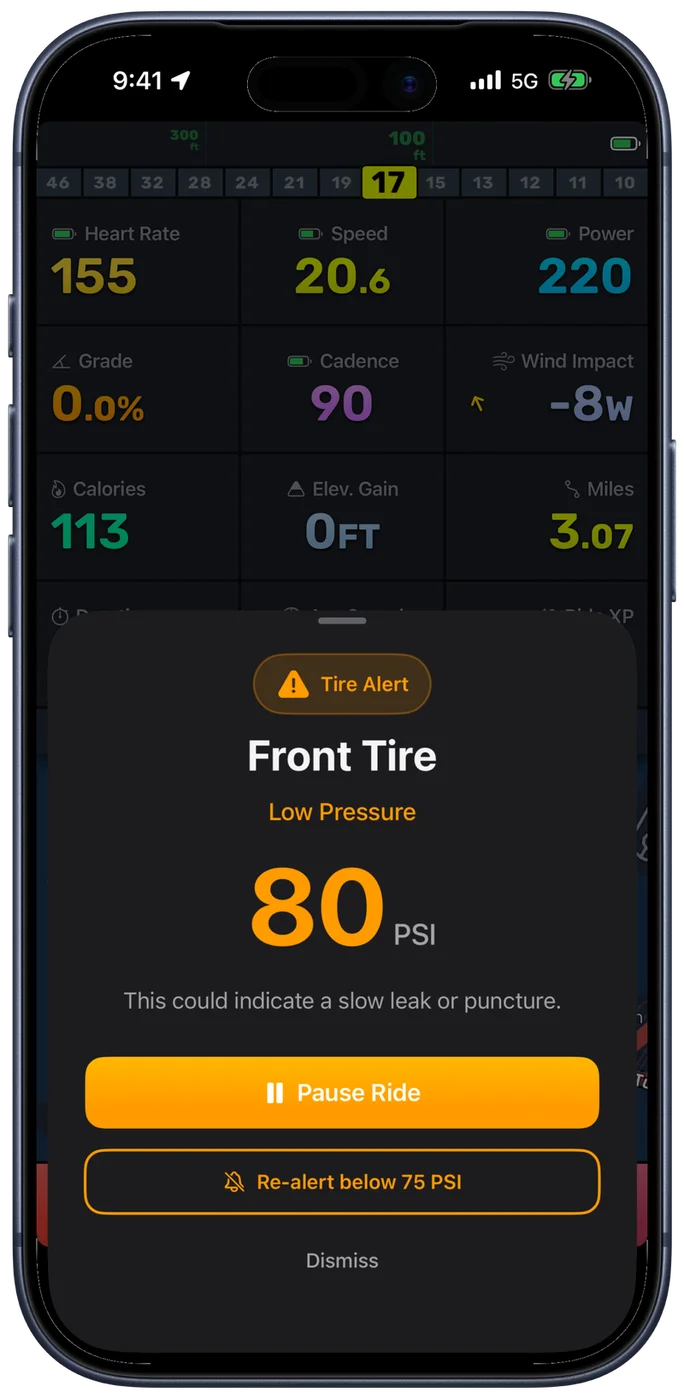
Thresholds are set per bike, because a road bike at 80 to 100 PSI and a gravel bike at 35 to 60 PSI have nothing in common. When a reading falls below yours, an alert names the tire, shows the pressure, and offers to pause the ride or to set a re-alert threshold so you are not interrupted repeatedly if you decide to keep going.
Pressure normally rises a few PSI as the tires warm over the first part of a ride and then holds steady. A line that keeps drifting down instead of levelling off is the signature of a slow leak, which is visible in the ride report afterwards.
Worth Knowing
- RideNow TPMS 1.0: The same sensor is sold under other names. If yours came in different packaging but screws onto the valve the same way, it is worth trying.
- Tubolito SYNCD: The sensor is part of the inner tube, so there is nothing to fit and nothing to charge. It lasts as long as the tube does.
Missing a Sensor?
Sensors get added based on what people actually ride with. If yours is not here, open the sensor list in Bike IQ, tap Can't find your sensor? and send us the brand and model. That sends what your sensor is broadcasting along with it, which is what makes a new one possible to add.
Related Guides
- Bluetooth Sensor Pairing: adding a sensor and assigning it to a wheel
- Safety Features: pressure alerts alongside radar and the rest
- Bike Profiles: where per-bike thresholds and sensor assignments live
- Ride Report: both tires plotted across the ride
- Compatible Sensors: every sensor type Bike IQ works with