The Road Ahead
Bike IQ shows you the elevation and grade of the road in front of you before you reach it, so you can pace your effort instead of being surprised by the terrain. It runs continuously, not just when a climb is detected, and works whether or not you are following a planned route.
The road ahead preview is part of Bike IQ Pro.
What the Road Ahead Shows
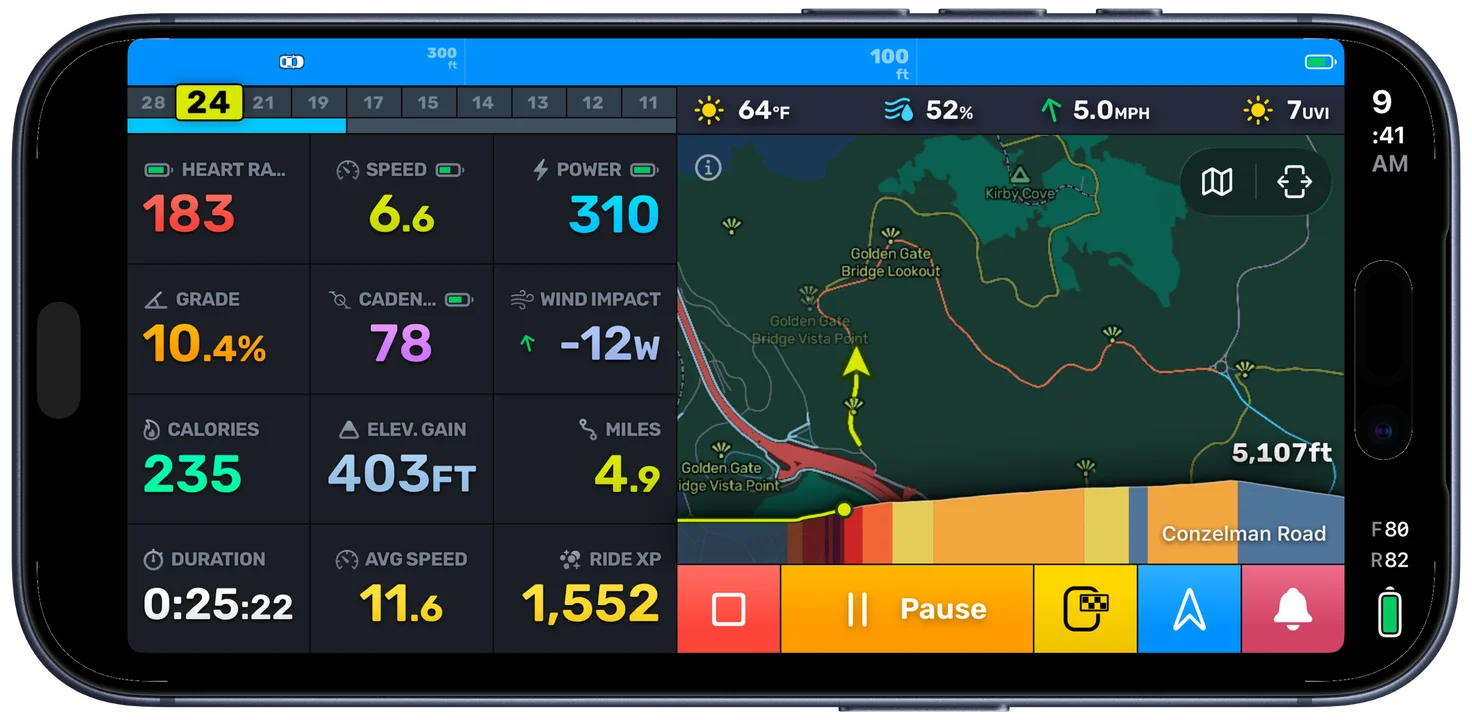
As you ride, Bike IQ reads the terrain of the road in front of you and draws it as a profile at the bottom of the map. You see the shape of what is coming (climbs, descents, and rollers) along with the grade of each section and how far away it is. It is the same elevation and grade information you get when previewing a route, except it tracks the road you are actually on in real time.
This turns a blind corner into a known quantity. Instead of guessing whether a climb keeps going or crests just out of sight, you can see how steep it gets and how long it lasts, and ride it accordingly.
How It Anticipates Your Road
On a planned route, the preview simply follows your course. What sets it apart is what happens when you have no route set: Bike IQ anticipates the road you are most likely to take next and draws the terrain along it, so the elevation ahead is there even on a free ride with no destination.
Roll out the door with no plan, turn down a road you have never ridden, and Bike IQ still shows you what is coming. As you make turns, the preview re-anticipates your path and updates, so the road ahead keeps matching the road you are actually on.
Climbs Ahead
On top of the continuous elevation profile, Bike IQ still flags the genuine climbs. When it detects a real climb on the road ahead, the map can automatically switch to a climb-focused camera that zooms out to show the full remaining climb, shaded by grade, with how far is left to the top and how far through it you are. When the climb ends, the camera returns to your normal ride view.
You control how sensitive this is in Map & Routes: set the minimum climb category, elevation gain, and grade thresholds so only the climbs you care about trigger a preview, and toggle Auto Switch to Climb Mode on or off. See Map Display for how Climb Mode and the elevation overlay behave on screen.
Built to Work Offline
The road ahead keeps working when your signal does not. Map and terrain data download as you ride into new areas, so the elevation of the road in front of you stays available even out past cell coverage. There is no separate step to remember. The data you need fills in as you go.
Note: When you ride into a brand new area with no signal and no cached data, the road ahead may be limited until the terrain for that area has been downloaded. Riding through an area once, or previewing a route there while online, fills in the data for next time.
Turning It On
The road ahead lives in Map & Routes, alongside the route elevation profile and climb detection. The elevation overlay shows continuously; the climb detection thresholds (category, elevation gain, and grade) control when a rise is flagged as a climb and whether the map switches to Climb Mode. Tune them to taste.
The elevation of the road ahead comes from Bike IQ's own map data rather than your phone's sensors, so the preview needs no extra permissions and keeps working offline. (Your live grade, the steepness of the road you are on right now, is the separate reading that uses the barometer.)
Related Guides
- Map & Routes: climb detection thresholds, the route elevation profile, and Auto Switch to Climb Mode
- Map Display: the camera modes, the elevation overlay, and grade color coding on the map
- Navigation and Routes: planning a route and following turn-by-turn directions
- Virtual Power Meter: how live grade feeds into power and pacing