Navigation Voice
Navigation Voice settings control the voice used for turn-by-turn directions during route navigation.
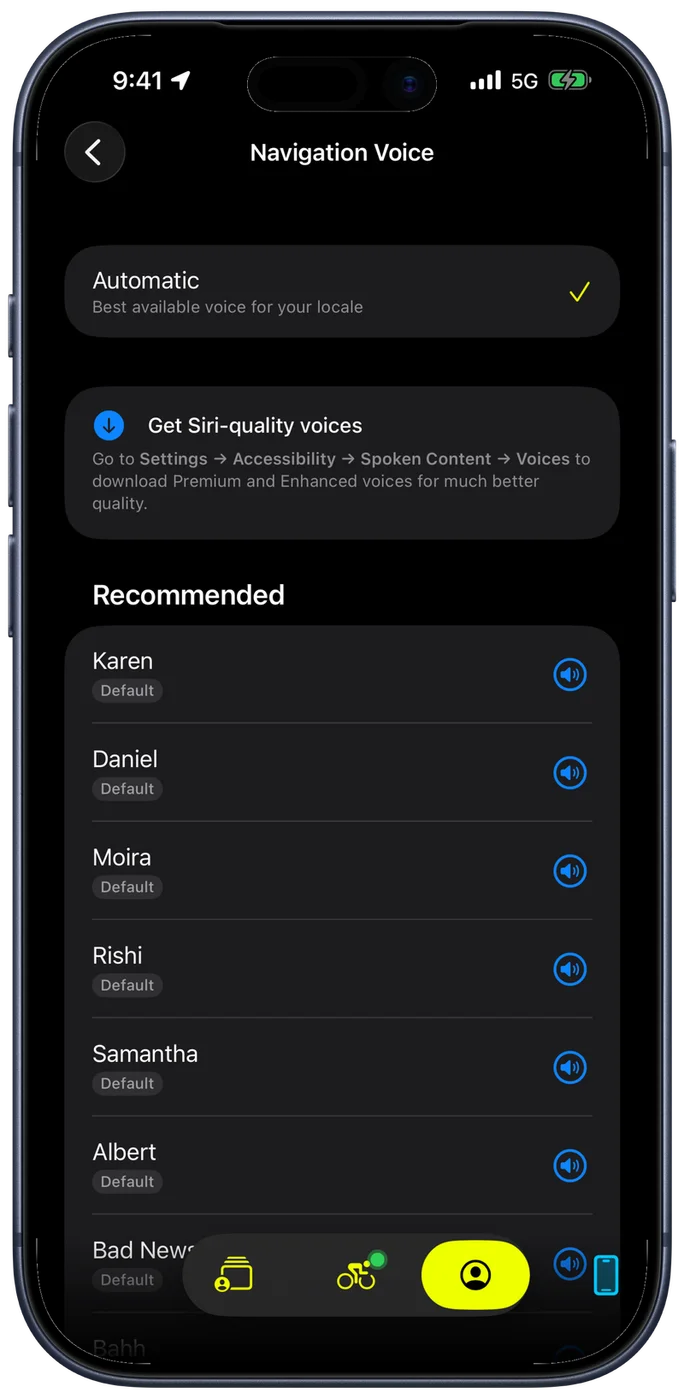
Picking a Voice
The screen opens on Automatic, described as the best available voice for your locale. An iPhone set to French gets a French voice, one set to English (US) gets an American English one. For most riders that is the right answer and the screen never needs opening.
Below it, Recommended lists the voices that match your device language. Everything else is behind Show All Languages, which opens the full set grouped by language, so the list starts short instead of starting with hundreds of voices.
The voice language is independent of the app's language. Running the app in English with a French navigation voice is a perfectly normal setup if you are riding in France and would rather hear street names pronounced properly.
Hearing One Before You Ride
Every voice has a speaker button on its row. Tap it and the voice reads a real instruction, "In 200 feet, turn left", so you are judging it on the thing you will actually hear rather than on a generic sample.
Try them at something close to riding volume. A voice that is clear in a quiet room does not necessarily cut through wind noise and traffic.
If iOS will not play a voice, its row says Not available on this iPhone rather than previewing in a substitute, which would otherwise let you confirm a voice and then hear a different one for the whole ride.
Better-Sounding Voices
iOS ships compact voices and offers larger Premium and Enhanced ones that sound considerably more natural. They are not part of Bike IQ, so they are downloaded from iOS: Settings → Accessibility → Spoken Content → Voices. Once a voice is downloaded it appears in this list like any other.
If you pick a voice and later remove it from iOS, Bike IQ says so on this screen rather than failing quietly, and keeps giving you directions in the closest voice it can find until you either download it again or choose another.
Related Guides
- Navigation and Routes: turn-by-turn navigation, route following, and off-course alerts
- Voice Control: Siri commands for hands-free ride management
- Settings and Customization: all configurable preferences in Bike IQ