Heart Rate Monitoring for Cycling
Apple Watch can replace a dedicated heart rate monitor for most cyclists. This guide covers setup, accuracy, and when you might prefer a Bluetooth heart rate monitor.
Apple Watch for Cycling Heart Rate
Apple Watch provides accurate heart rate monitoring during cycling. When you start a ride in Bike IQ, your Apple Watch automatically detects the activity, begins heart rate monitoring, and sends live data to your iPhone. It stops when you end the ride.
Apple Watch heart rate accuracy is typically within 2-3 beats per minute of Bluetooth heart rate monitors during steady efforts, making it suitable for training and fitness tracking.
Apple Watch vs Bluetooth Heart Rate Monitor
Apple Watch Advantages
- Already on your wrist if you own one
- No additional device to charge
- Automatic pairing with Bike IQ
- Comfortable for long rides
- Weather resistant
Apple Watch Limitations
- Slightly less responsive during high-intensity intervals
- Can be affected by loose watch bands
- Requires iPhone proximity
Bluetooth Heart Rate Monitor Advantages
- Most accurate during high-intensity efforts
- Instant response to heart rate changes
- Works with multiple devices simultaneously
- Professional-grade accuracy
Bluetooth Heart Rate Monitor Limitations
- Additional device to charge and remember
- Can be uncomfortable during long rides
- Requires proper positioning for accuracy
Setting Up Apple Watch with Bike IQ
- Open iPhone Settings → Health → Data Access & Devices
- Select Bike IQ and enable Heart Rate permission
- Open Bike IQ > Settings > Connect Bluetooth Sensors
- Your Apple Watch appears automatically - tap to connect
Ensure your Apple Watch band is snug but comfortable. Loose bands can cause inaccurate readings during bumpy rides.
Heart Rate Monitor Recommendations
If you prefer a dedicated heart rate monitor, these models work well with Bike IQ:
Polar H10
Excellent accuracy, long battery life (400+ hours), and comfortable chest strap. Works with all cycling apps.
Wahoo TICKR
Good value option with reliable connection and easy setup. Compatible with multiple devices.
Garmin HRM-Pro
Premium choice with advanced analytics, running dynamics, and excellent build quality.
Setting Up Bluetooth Heart Rate Monitors
- Activate your heart rate monitor (put on chest strap, wrap arm band, etc.)
- Open Bike IQ > Settings > Connect Bluetooth Sensors
- Your monitor appears in the device list
- Tap to pair
For chest strap models, wet the electrodes before wearing, position just below chest muscles, and clean after sweaty rides.
Keeping More Than One Strap
If you own two straps, add them both. Bike IQ connects every strap assigned to you and follows whichever one you are actually wearing, so you can grab either on the way out of the door and get heart rate without going into settings first.
With two straps in range at once, the one that is streaming keeps the reading. Bike IQ only hands over after the active strap has gone quiet for a few seconds, so the number never flickers between them. A strap that is streaming is preferred over your Apple Watch, and the Watch is only used when you have chosen it as your source, so picking a strap never starts a workout on your wrist.
Heart Rate Training Features
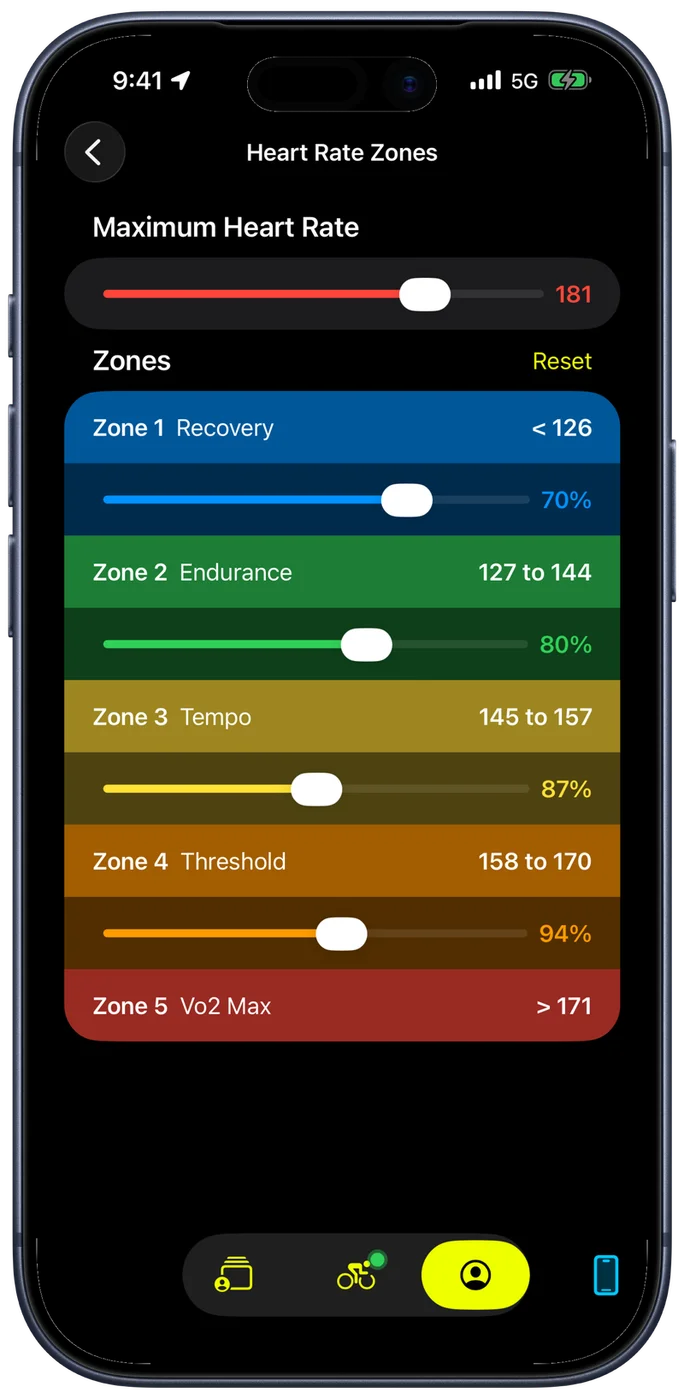
Zones are built from the maximum heart rate you set yourself, on a slider from 120 to 200 bpm. There is no age formula: you give Bike IQ your real number, and each of the four zone boundaries is adjustable from there. During rides, you see current heart rate, zone indicators, and average heart rate. Post-ride analysis includes heart rate graphs and zone time distribution.
Troubleshooting Heart Rate Issues
Apple Watch Connection Problems
- Check Health app permissions for Bike IQ
- Restart both iPhone and Apple Watch
- Ensure Apple Watch is unlocked and on your wrist
Inaccurate Readings
- Adjust watch band tightness
- Clean the back of your Apple Watch
- Check for interference from other devices
Bluetooth Heart Rate Monitor Issues
- For chest straps, wet electrodes for better skin contact
- Replace battery (common after 6+ months)
- Check device positioning and fit
- Re-pair the device if connection problems persist
Choosing the Right Option
Choose Apple Watch if: You already own one, want simplicity, do mostly endurance riding, and prefer fewer devices to manage.
Choose a Bluetooth heart rate monitor if: You do serious interval training, race competitively, want maximum accuracy during high-intensity efforts, or use multiple cycling apps.
Many cyclists use Apple Watch for casual rides and a Bluetooth heart rate monitor for structured training. Bike IQ makes it easy to switch between either option.
Getting Started
If you have an Apple Watch, start there. The setup takes under two minutes and provides excellent heart rate data for most cycling. You can always add a Bluetooth heart rate monitor later for maximum training accuracy.