Bike Bell
Bike IQ turns your iPhone into a bike bell that pedestrians can actually hear. Activate it with a palm gesture or a button tap, and the bell plays through your phone speaker even when headphones are connected.
Activation Methods
There are two ways to ring the bell during a ride, plus a Siri Shortcut for hands-free activation:
Palm Gesture
Place a flat palm on the screen to ring the bell. The app detects when a broad surface touches the display and distinguishes it from a normal finger tap. This means you can slap the screen with your palm without worrying about accidentally triggering other controls.
The palm gesture works with cycling gloves. Gloved hands register the same broad touch pattern as bare palms, so you do not need to remove your gloves to use the bell. This makes the gesture practical in cold weather and on longer rides where gloves are standard gear.
Button Tap
The bell button appears in the session controls during a ride. Tap it to ring the bell with your configured sound. This is a straightforward alternative when you prefer a precise tap over the palm gesture.
Siri Shortcut
Bike IQ exposes the bell as a Siri Shortcut, so you can trigger it hands-free without looking at the screen. Assign it to the Action button on iPhone 15 Pro or later, to Back Tap (Settings → Accessibility → Touch → Back Tap), or to a Lock Screen or Home Screen widget for a one-tap bell from the bars. The voice command "Ring bell with Bike IQ" still works if you prefer Siri. See Voice Control for the full list of supported shortcuts.
Speaker Override
The speaker override feature is what makes the bike bell genuinely useful in the real world. When headphones are connected, the bell automatically plays through the iPhone's built-in speaker instead of your headphones. Pedestrians and other cyclists hear the bell sound from your phone, not from your earbuds.
When headphones are connected, the bell automatically plays through the iPhone's built-in speaker instead of your headphones. Your music or podcast continues playing without interruption.
Without headphones connected, the bell simply plays through the speaker at whatever volume your phone is set to.
Sound Options
Bike IQ includes several bell sound categories. Configure your preferred sound in Settings under Bike Bell:
- Classic Bell: a traditional bicycle bell ring. Clean and recognizable.
- Classic Rotary: a continuous rotary bell sound, like a mechanical bell spinning against a striker.
- Digital Rotary: a synthesized version of the rotary bell with a sharper tone.
- Horn: a louder, more assertive horn sound for situations where a bell is not enough.
- Siren: a cycling siren tone for high-traffic or emergency situations.
- Alert: a short alert tone that cuts through ambient noise.
Configuration
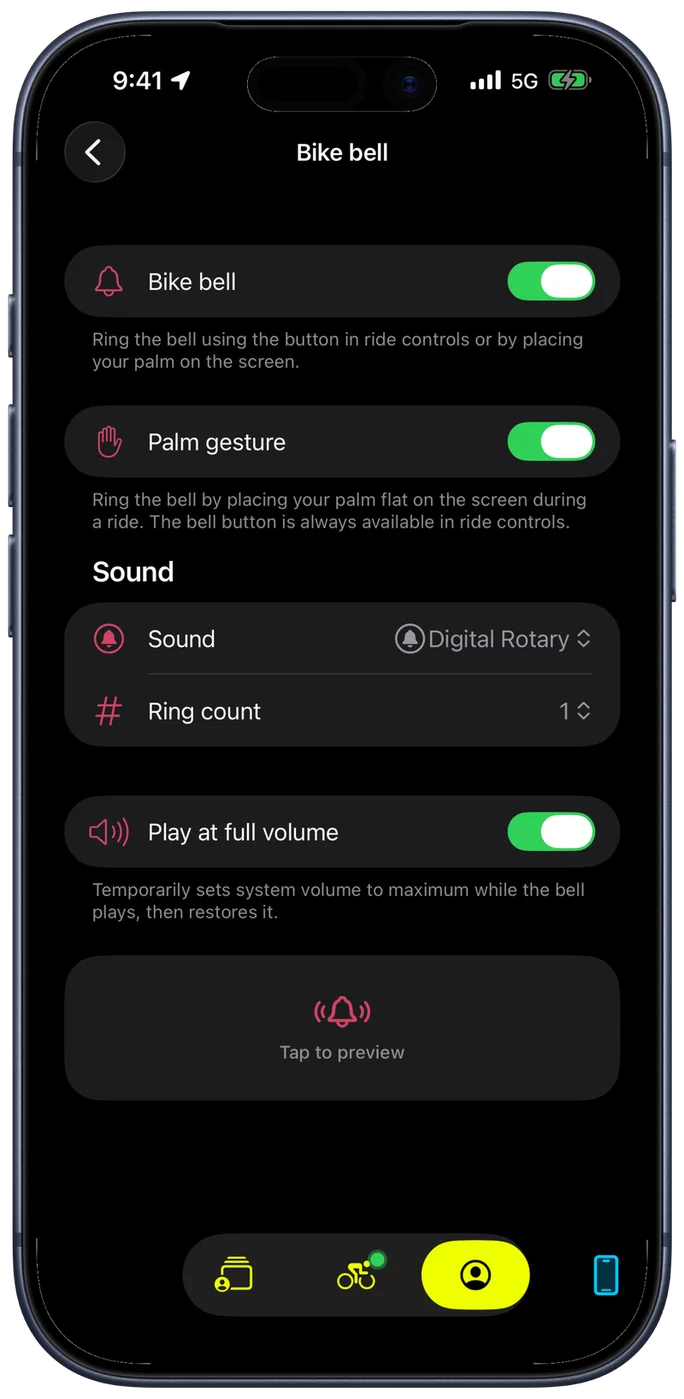
The bell's settings live under Configuration → Ride Settings → Bike bell. Which controls you see depends on the sound you picked, because a bell that rings and a horn that sustains are not tuned the same way.
Classic Bell, Classic Rotary, Digital Rotary and Alert ring, so they get:
- Ring count: 1, 2 or 3 rings per activation. A single ring is subtle and polite. Three is more insistent for a crowded path.
- Ring spacing: the gap between consecutive rings, from 0.10 to 0.50 seconds. Shorter is a rapid, urgent sequence; longer is measured. It only appears once the ring count is above 1, since one ring has nothing to be spaced from.
Horn and Siren sustain instead of ringing, so they get:
- Duration: how long the sound holds, from 0.5 to 2.0 seconds. Longer carries further in traffic.
Two settings apply whichever sound you choose:
- Palm gesture: turn the palm-on-screen ring off if you would rather only use the button. The bell button stays in ride controls either way.
- Play at full volume: temporarily sets the system volume to maximum while the bell plays, then puts it back where it was. This is what keeps the bell audible when your phone volume is set low for music.
Tap the sound in the picker to hear it before you ride.
When to Use the Bell
The bike bell is designed for the same situations where you would use a physical bell:
- Alerting pedestrians on shared paths and multi-use trails
- Signaling your approach to other cyclists when passing
- Warning at blind corners or narrow trail sections
- Getting attention at intersections or crosswalks
The speaker override makes this practical in a way that most phone-based bells are not. If you are wearing headphones, a bell that only plays in your ears does nothing for the people around you. Bike IQ solves this by routing the sound to the speaker automatically.
Related Guides
- Voice Control: ring the bell and control your ride with Siri
- Settings and Customization: audio settings, bell configuration, and other preferences
- Recording a Ride: the ride screen, session controls, and ride features