Audio Alerts
Audio Alerts give you audible confirmation when ride events happen, so you know your ride state changed without taking your eyes off the road.
Why Audio Feedback Matters
When you are riding, your eyes should be on the road. A short sound confirming that your ride paused, resumed, or ended is faster and safer than glancing at your screen to verify. Audio alerts close the feedback loop, you hear the confirmation and keep riding.
This is especially important for auto-pause and auto-resume events. Without an audible cue, you might not realize Auto-Pause kicked in at a stoplight or resumed when you started moving. The sound tells you the app is doing its job.
Available Alerts
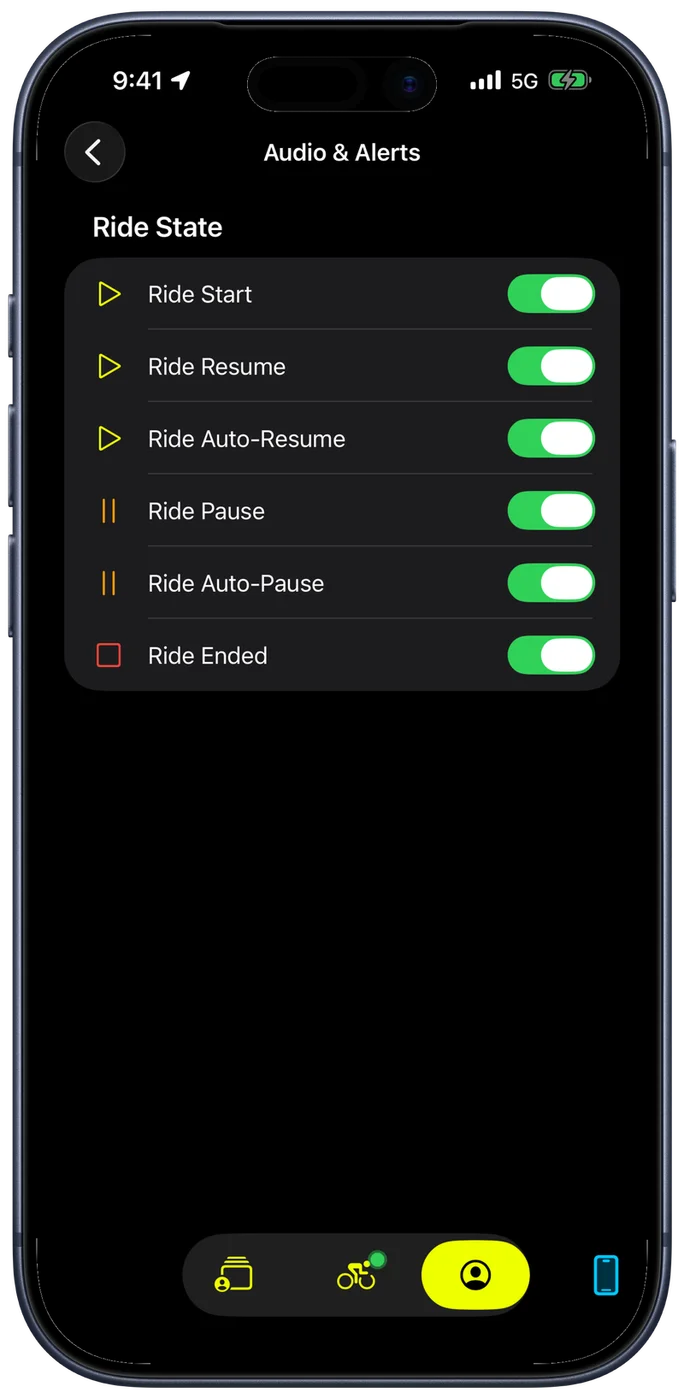
Under Ride State, each ride event has its own toggle, so you can enable exactly the alerts you want and silence the rest:
- Ride Start: plays when you begin a new ride. Confirms the recording is active.
- Ride Resume: plays when you manually resume a paused ride. Lets you know the timer is running again.
- Ride Auto-Resume: plays when Auto-Pause detects movement and resumes recording on its own. This is the alert most riders find essential, because the resume happens without any user action.
- Ride Pause: plays when you manually pause the ride. Confirms the recording stopped.
- Ride Auto-Pause: plays when the app detects you have stopped and pauses automatically. Useful at traffic lights so you know the clock is no longer running.
- Ride Ended: plays when you finish and end the ride. A clear signal that recording has stopped and the ride is complete.
Alert Volume
Alert Volume at the top of the screen sets how loud these sounds play, independently of your phone's own volume. It covers the rear-vehicle radar alert too, which is the one worth getting right: loud enough to hear over wind and traffic at speed, without being startling.
Release the slider and Bike IQ plays a preview at the level you just set, so you can tune it indoors rather than discovering it is wrong on a descent.
Where the Sounds Play
Alerts follow whatever your iPhone is playing through, so with headphones or AirPods in, that is where you hear them. Your music or podcast keeps playing underneath rather than stopping.
If the alerts are hard to hear at riding speed, raise Alert Volume first, then your phone's volume. The two multiply, so a low phone volume caps what the slider can do.
The bike bell is the one sound that behaves differently. It is meant for the people around you rather than for you, so it is forced out of the iPhone's own speaker even when headphones are connected.
Choosing Which Alerts to Enable
Most riders enable all alerts initially and then turn off the ones they find unnecessary. A good starting point: keep Auto-Resume and Auto-Pause enabled, since those events happen without your input and the audio confirmation is genuinely useful. The Start and Pause alerts are less critical because you triggered those actions yourself and already know they happened.
If you ride in quiet neighborhoods or on peaceful trails, you may prefer fewer sounds. If you ride in noisy urban environments, more alerts help you stay aware of your ride state without checking the screen.
Related Guides
- Ride Assist: Auto-Pause, Wait for Movement, and other automatic ride management
- Bike Bell: speaker override, bell sounds, and palm gesture activation
- Settings and Customization: all configurable preferences in Bike IQ