Bike IQ 1.4.4: Every Turn on Your Screen
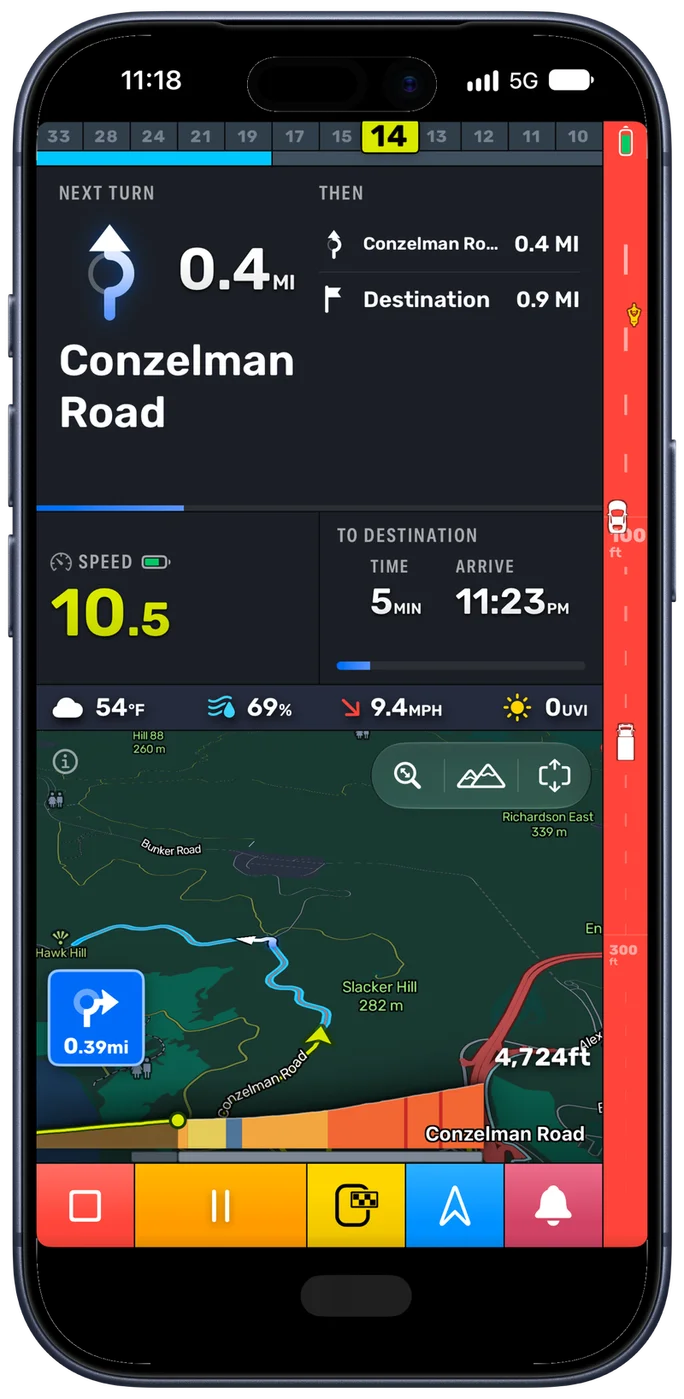
Navigation used to live on the map. In 1.4.4 it gets tiles of its own: the next turn, the road it takes you onto and the turn after it, at whatever size you give it, on a page that comes up by itself as you near each turn. Around it, you choose how the map behaves on a ride and on a route separately, the map buttons can grow, the Ride Report's elevation chart matches the route chart, and Di2 and AXS tell you when you run out of gears.
Navigation tiles
Three new tiles read the route you are following, and each one changes with the size you give it:
- Next Turn: which way, how far, and the road it takes you onto, with a bar that fills as you get closer. Give it room and it adds the turn after, or several. When the road has no name, it says what to do, such as Turn left.
- Upcoming Turns: the turns and stops ahead as a list, with how far each one is.
- To Destination: the distance left and a track of the whole route, plus the time left and when you will arrive on a wider tile.
You do not have to build anything. The new Navigation page is an Auto Page that comes up as you near a turn, with Next Turn large, your speed and To Destination, and goes away once the turn is behind you. Two turns close together count as one, so it stays up between them. On the map, the next turn now glows on the road itself. See Navigation Tiles and The Navigation Page.
Two new conditions let you build your own: Navigating holds a page for the whole route, and Route Finished brings one up when you arrive. The list of conditions has grown, so Add a Condition now has a search that takes the same words as the tile list: "watts" finds power and "lost" finds Off Route. See Navigation Conditions.
A map for the ride, and one for the route
Follow Zoom and tilt now have a Ride tab and a Route tab, in Settings, Map Display. So the map can stay flat and close while you navigate, and sit tilted and far on a free ride, or the other way round. Tilt is now a slider, from Flat to 60 degrees, and a small map above it shows what you are setting. See Ride Map.
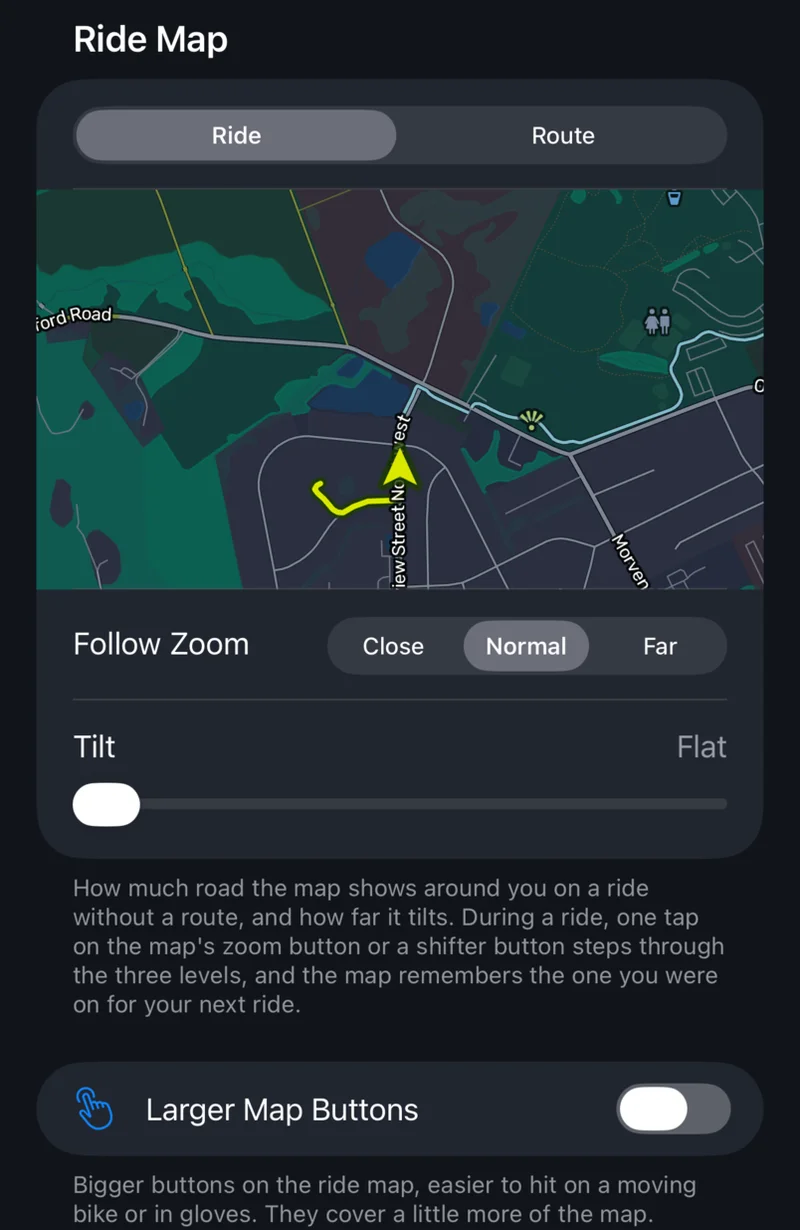
Larger Map Buttons, just below, makes the zoom, camera and expand buttons bigger, so they are easier to hit on a moving bike or in gloves. It is off by default, because bigger buttons cover a little more of the map. See Larger Map Buttons.
One elevation chart
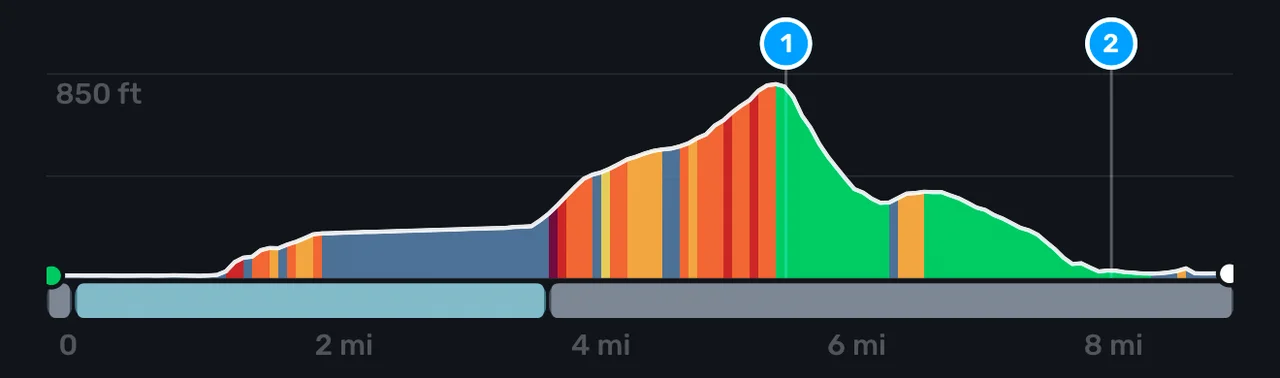
The Ride Report's elevation chart is now drawn like the route chart: a white line on top, colored by grade underneath, with colors that gain detail as you zoom in. Descents are green, on the Ride Report and on route charts, and the Ride Report map's Grade line uses the same colors, so one climb reads as one color on both. See Elevation and Climb Colors.
Shifting
- Out of Gears. Two short beeps when a Di2 or AXS shift has no gear left to go to, so you know without looking down. It is on by default, under Shifting in Sound & Voice. See Out of Gears.
- AXS keeps the real gear. On a long stretch in one gear, the screen now stays on the gear your SRAM AXS groupset reports instead of going to the estimate. See Gear Detection.
E-bikes
- An offer to connect. When you add a TQ, Specialized, BESV or Mahle e-bike from the bike search, Bike IQ offers to connect its motor. For other motors, Ask for It sends us a request, already written. See When Bike IQ Offers to Connect.
- Range Extender tile. Your extender's charge beside the main battery, on TQ and Mahle e-bikes. A drained pack reads 0%. See Range Extender.
The Bike IQ Club on Strava
With Strava connected, the Strava screen has a Join the Bike IQ Club row that opens the club on Strava, where you join with Strava's own button. See The Bike IQ Club on Strava.
Fixes
- A sensor that drops mid-ride no longer blanks the rest of the Ride Report, your ride files or Apple Health.
- The ride description grows with what you write and stays above the keyboard.
- Saving to Apple Health keeps going if you leave the app after Save.
- Apple Watch heart rate comes back more reliably when the Watch workout reconnects.
- The heart rate tile no longer holds an old number: after 30 seconds without a reading it shows a placeholder, with the reading's age in the title.
- Routes no longer send you onto a long ferry crossing when you could ride instead.
- Other bug fixes and performance improvements.
Getting it
Bike IQ 1.4.4 is on the App Store now. The map settings, Larger Map Buttons, the elevation chart, Out of Gears and the e-bike offer are free. Navigation, the navigation tiles and showing Smart Pages on the ride screen come with Bike IQ Pro.