Bike IQ 1.4.2: A Route Builder With Room for the Map
1.4.2 is about planning. The route builder and the route viewer are redesigned around the map: the controls sit in one panel you can pull up or push down, search finds places along your route, and a tap on the elevation chart picks the spot you want. Zoom into a climb on the chart and the map follows. Around that, routes can use highways where bikes are allowed, two new grade tiles tell you how steep the ride really was, your effort rating reaches Apple Fitness, and Auto-Pause stops pausing you on slow climbs.
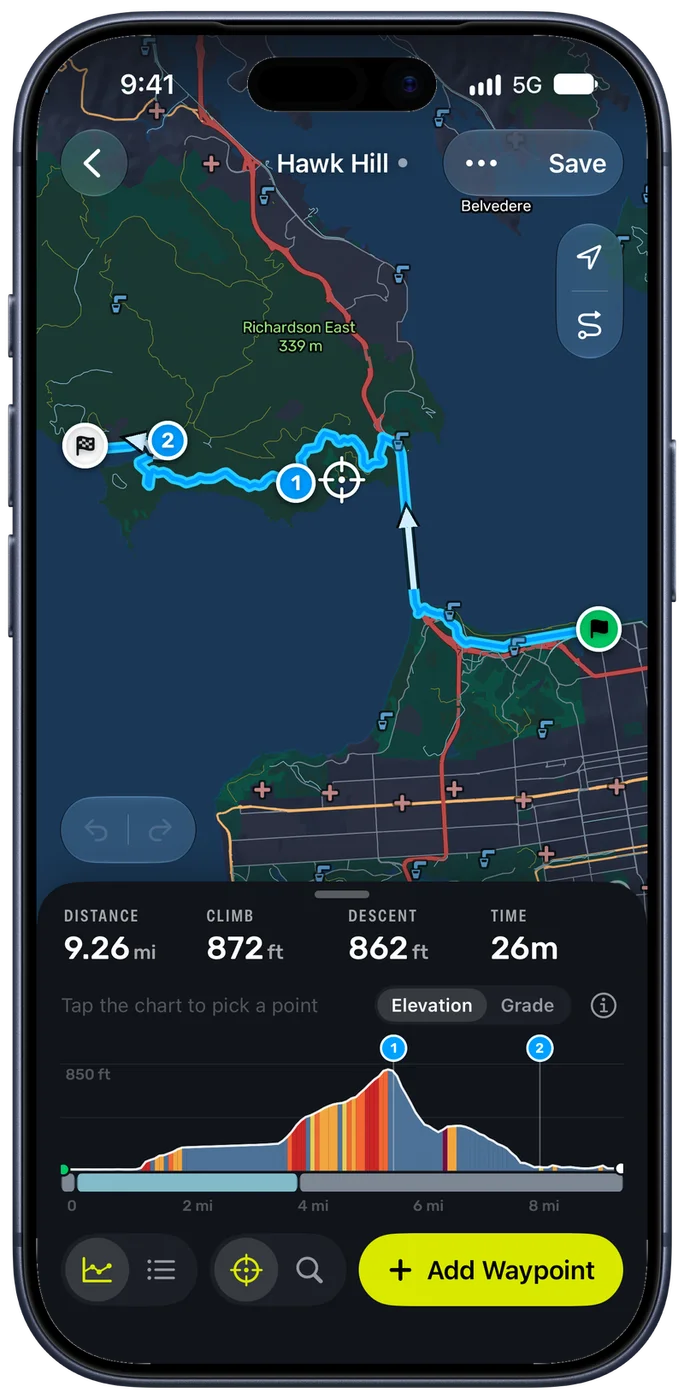
A redesigned route builder
The map now runs edge to edge, and everything else lives in one rounded panel at the bottom. Drag it up for the elevation chart and the list of waypoints, or down to give the map the screen. One row holds what you need next, with a single bright button for the main action, and undo and redo float over the map just above it.
- Tap the elevation chart to pick a point. The map shows where it is, and Insert Here adds a waypoint right there, between the ones around it.
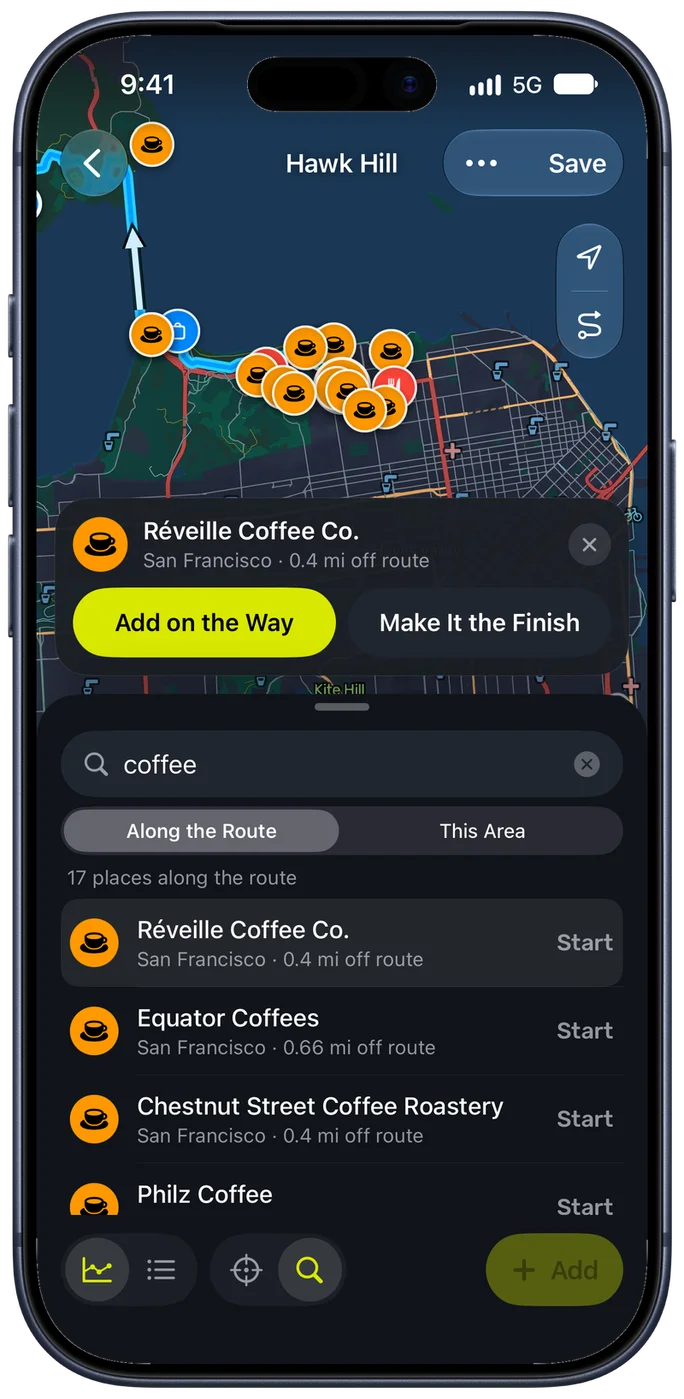
- Search along your route. Results come from the roads you are about to ride, sorted by how far along they are, with Along the Route and This Area to switch. Pick a café and choose Add on the Way to slot it in where it belongs, or Make It the Finish.
- Waypoints and rest stops show on the chart, so you can see where your stops fall on the climb.
- A new route starts where you are. The empty builder finds your location, and Start From My Location shows that it is working.
- Landscape. Turn the phone and the panel moves to the left, with the map uninterrupted beside it.
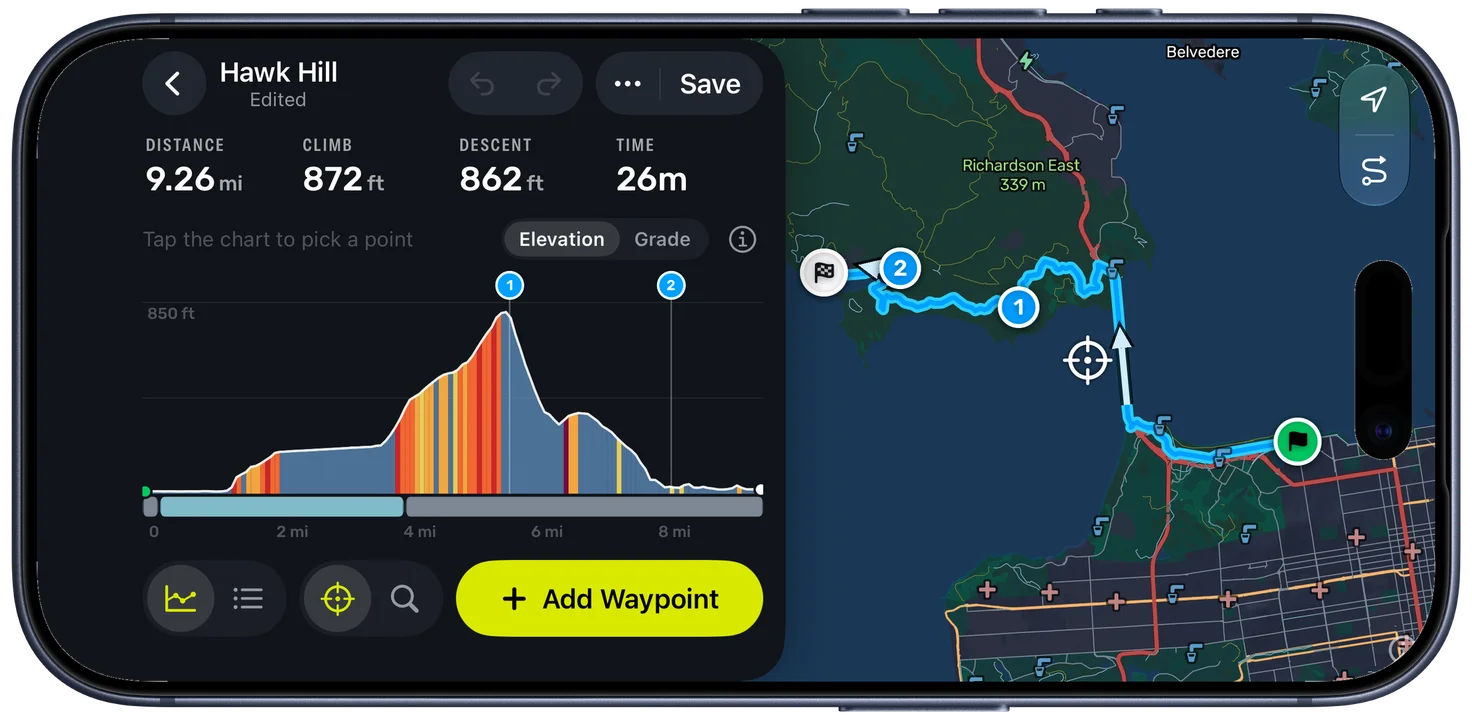
The route viewer, where you open a saved route, got the same panel: drag it, or drag its header, to make room for the map. The full guide is in Route Builder.
Zoom the chart, the map follows
Pinch the elevation chart to zoom in on a stretch of the route, and the map frames that same stretch of road. Pan along the chart with two fingers and the map keeps up, so a climb you zoom into on the chart fills the map too. Pinch back out, or double-tap the chart, for the whole route again. It works in the builder and in the route viewer. See Zoom In on a Stretch.
Routes on highways
In much of the world cyclists may ride parts of a motorway or expressway. An imported route (a GPX file, or a route from Strava or Ride with GPS) that uses a stretch of highway now follows your line along it, instead of being quietly moved onto other roads. The route viewer shows a note under the stats ("Uses highways for 0.4 km. Check that bikes are allowed and ride with care.") and the highway stretch is red in the road type bar, so you know before you go. Any route can allow highways from Route Tools in the builder. Routes imported before 1.4.2 keep the shape they were given, so import them again to get your line back. See Importing Routes.
Avg Grade and Max Grade
Two new tiles for your Smart Pages, each over the climb you are on, the lap, or the whole ride. Max Grade is the steepest grade you rode. Avg Grade over a lap or a ride counts only the climbing, so a hilly loop does not average out to zero; over a climb it is the climb's own average, from its foot to where you are. The Ride Report's grade chart now shows the same Avg and Max, for the ride or the stretch you zoom into.
Your effort, in Apple Fitness
When you rate how hard a ride felt on Ride Complete and the ride goes to Apple Health, the rating now becomes the workout's Effort score (iOS 18 and later). Apple Fitness shows it on the workout and uses it for Training Load, so you no longer enter it twice. Change it later in the Ride Report and Health follows. Only a rating you set is sent, never the suggestion. If you connected Apple Health before, your iPhone asks once for permission the first time you save a rated ride. See Strava & Integrations.
Auto-Pause on slow climbs
Auto-Pause still pauses the moment you stop at a light. What it no longer does is pause you while you grind up a steep climb at walking pace, or while you are still pedalling with a cadence sensor or power meter paired. A long, slow climb is now recorded as riding, not as a string of short pauses. See Ride Assist.
Still planning to ride?
Tapped Start Ride and then never left? Ten minutes after a ride that has barely moved stops, Bike IQ sends a notification asking Still planning to ride?, with End Ride and Keep Going. A ride that has gone somewhere, or a trainer session paused for a break, is never asked. See Recording a Ride.
Fixes and reliability
- Adding a bike from Settings, My Bikes no longer crashes.
- A rest stop no longer adds climbing to a route. Marking a waypoint as a rest stop could add a climb that was not there to the route's total and its elevation chart.
- Maps are sharp in landscape on every map screen, where they used to look slightly soft.
- E-bike rides exported as FIT files are marked as e-bike rides, so Garmin Connect, intervals.icu or a manual Strava upload file them correctly. See Exporting Your Rides.
Getting it
1.4.2 is on the App Store now. The Auto-Pause change, your effort in Apple Fitness, the Still planning to ride? prompt and the fixes are free. The route builder, route import and the route viewer, and showing your pages (with the new grade tiles) on a ride, are part of Bike IQ Pro.